前言 好一段時間沒有發表學習文了,主要是因為我花了兩個禮拜的時間研究這個東西,終於找到了原因和使用方式。雖然有ChatGPT的幫助,但還是沒有解決我現在要特別標記的主題。
(P.S. 這次的主題是我卡了很久的一個技術問題。)
React Router 中 Outlet 在父路由元素中,應該使用 來呈現其子路由元素。這樣,當子路由被渲染時,嵌套的使用者介面就能夠顯示出來。如果父路由完全匹配,它會渲染一個子索引路由,如果沒有索引路由,則不會呈現任何內容。
1. 類型聲明 (Type declaration) 1 2 3 4 5 6 interface OutletProps { context ?: unknown ; } declare function Outlet ( props : OutletProps React .ReactElement | null ;
2. 參考官方作法 1 2 3 4 5 6 7 8 9 10 11 12 13 14 15 16 17 18 19 20 21 22 23 24 25 26 function Dashboard ( return ( <div> <h1>Dashboard</h1> {/* This element will render either <DashboardMessages> when the URL is "/messages", <DashboardTasks> at "/tasks", or null if it is "/" */} <Outlet /> </div> ); } function App() { return ( <Routes> <Route path="/" element={<Dashboard />}> <Route path="messages" element={<DashboardMessages />} /> <Route path="tasks" element={<DashboardTasks />} /> </Route> </Routes> ); }
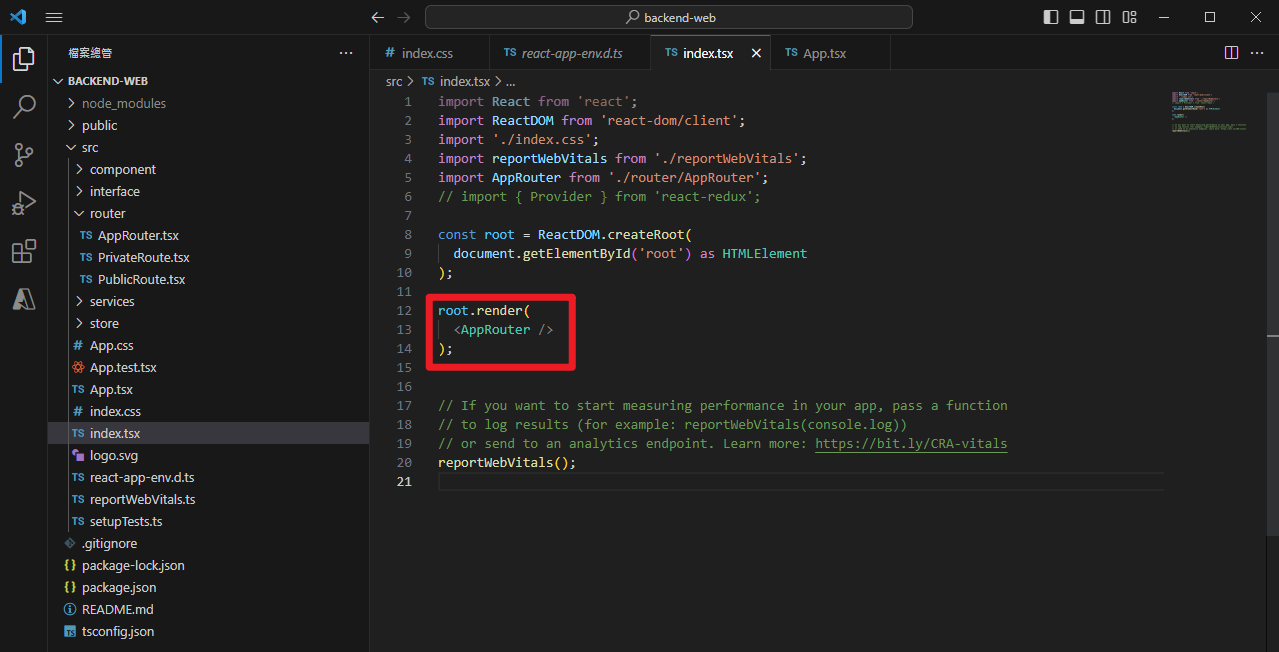
前置作業 首先,將【index.tsx】放入要執行的Router中,這次的修改將以此為主要依據。
AppRouter 原始作法 讓我簡單解釋一下下面的程式碼的作用:
Adminlte 需要加入 Js或是 css 才能使用他們的css
1 2 3 4 5 6 import 'admin-lte/dist/css/adminlte.min.css' import 'admin-lte/plugins/fontawesome-free/css/all.css' import 'admin-lte/plugins/bootstrap/js/bootstrap' import 'admin-lte/plugins/bootstrap/js/bootstrap.bundle' import 'admin-lte/dist/js/adminlte'
拆開的Layout
1 2 3 import Header from '../component/@Shared/@Layout/Header' ;import MenuSidebar from '../component/@Shared/@Layout/MenuSidebar' ;
Router 路徑
1 2 3 4 5 6 7 8 9 10 11 12 13 14 15 16 17 18 19 20 21 22 23 24 25 26 27 28 29 30 31 32 33 34 35 36 37 38 39 40 41 42 43 44 45 46 47 48 49 50 51 52 53 54 55 56 57 58 import React , { lazy } from 'react' ;import { BrowserRouter , Routes , Route , Link , Await } from 'react-router-dom' ;import 'admin-lte/dist/css/adminlte.min.css' import 'admin-lte/plugins/fontawesome-free/css/all.css' import 'admin-lte/plugins/bootstrap/js/bootstrap' import 'admin-lte/plugins/bootstrap/js/bootstrap.bundle' import 'admin-lte/dist/js/adminlte' import Header from '../component/@Shared/@Layout/Header' ;import MenuSidebar from '../component/@Shared/@Layout/MenuSidebar' ;import Home from '../component/@Views/TopList/Home' ;import About from '../component/@Views/TopList/About' ;import BDP000A from '../component/@Views/Systems/BDP000A/Index' ;import BDP000A _EditorForm from '../component/@Views/Systems/BDP000A/EditorForm' ;import ProfileHome from '../component/@Views/Profile/ProfileHome' ;import Alert from '../component/@Views/Template/Alert' ;import SampleTable from '../component/@Views/Template/SampleTable' ;import SampleReactTable from '../component/@Views/Template/SampleReactTable' ;import SystemConfig from '../component/@Views/Systems/SystemConfig/Index' const AppRouter = ( return ( <BrowserRouter > <div className ="wrapper" > <Header /> <MenuSidebar /> <div className ='content-wrapper' > <Routes > <Route path ="/" element ={ <Home /> } /> <Route path ="/about" element ={ <About /> } /> </Routes > <Routes > <Route path ="/BDP000A" element ={ <SystemConfig /> } /> <Route path ="/BDP000A/:key" element ={ <BDP000A_EditorForm /> } /> <Route path ="/Profile" element ={ <ProfileHome /> } /> <Route path ="/Menu" element ={ <SampleReactTable /> } /> <Route path ="/Temp/Alert" element ={ <Alert /> } /> <Route path ="/Temp/Table" element ={ <SampleTable /> } /> </Routes > </div > </div > </BrowserRouter > ); } export default AppRouter ;
變更方式 1. 將Layout拆開
創建 MainLayout.tsx
1 2 3 4 5 6 7 8 9 10 11 12 13 14 15 16 17 18 19 20 21 22 23 24 25 import { ReactNode } from "react" ;import Header from "./Header" ;import MenuSidebar from "./MenuSidebar" ;import 'admin-lte/dist/css/adminlte.min.css' import 'admin-lte/plugins/fontawesome-free/css/all.css' import 'admin-lte/plugins/bootstrap/js/bootstrap' import 'admin-lte/plugins/bootstrap/js/bootstrap.bundle' import 'admin-lte/dist/js/adminlte' import { Outlet } from "react-router-dom" ;const MainLayout = ( return ( <div className ="wrapper" > <Header /> <MenuSidebar /> <div className ='content-wrapper' > <Outlet /> </div > </div > ); }; export default MainLayout ;
創建LoginLayout.tsx
1 2 3 4 5 6 7 8 9 10 11 12 13 import { ReactNode } from "react" ;import Login from "../../@Views/Login/Index" ;import { Outlet } from "react-router-dom" ;const LoginLayout = ( return ( <div > <Outlet /> </div > ); }; export default LoginLayout ;
2. 將 AppRouter 加入Layout版本 1 2 3 4 5 6 7 8 9 10 11 12 13 14 15 16 17 18 19 20 21 22 23 24 25 26 27 28 29 30 31 32 33 34 35 36 37 38 import React , { lazy } from 'react' ;import { BrowserRouter , Routes , Route , Link , Await } from 'react-router-dom' ;import Home from '../component/@Views/TopList/Home' ;import About from '../component/@Views/TopList/About' ;import BDP000A from '../component/@Views/Systems/BDP000A/Index' ;import BDP000A _EditorForm from '../component/@Views/Systems/BDP000A/EditorForm' ;import ProfileHome from '../component/@Views/Profile/ProfileHome' ;import Alert from '../component/@Views/Template/Alert' ;import SampleTable from '../component/@Views/Template/SampleTable' ;import SampleReactTable from '../component/@Views/Template/SampleReactTable' ;import SystemConfig from '../component/@Views/Systems/SystemConfig/Index' import LoginLayout from '../component/@Shared/@Layout/LoginLayout' ;import Login from '../component/@Views/Login/Index' ;import MainLayout from '../component/@Shared/@Layout/MainLayout' ;const AppRouter = ( return ( <BrowserRouter > <Routes > <Route path ="/Login" element ={ <LoginLayout /> }> <Route path ="/Login" element ={ <Login /> } /> </Route > <Route path ="/" element ={ <MainLayout /> }> <Route path ="/" element ={ <Home /> } /> <Route path ="/about" element ={ <About /> } /> </Route > </Routes > </BrowserRouter > ); } export default AppRouter ;
參考文件
[Bonus 系列] - 來看看 React Router v6 有什麼新功能?和 v5 有哪些地方不同? React Router




![[筆記] Synology 創建 Docker datalust/seq 環境](/image/20250810_08-15-28.png)
![[DevOps] 創建一個 docker agent](/image/20250810_08-16-08.png)